The 3 p.m. neck ache. The shoulders creeping toward your ears. The lower back that complains every time you stand up after a long meeting. If you work at a desk, your body is probably sending you posture memos all day — and most of us ignore them until something starts to hurt.
Good posture isn't about sitting rigidly like a statue; it's about keeping your body in positions that distribute load evenly so no single joint or muscle does all the work. The encouraging news: small, consistent adjustments to how you sit, stand, and move through your workday may significantly reduce everyday aches. These 10 tips are practical, equipment-light, and designed for real desk workers — not ergonomic showrooms.
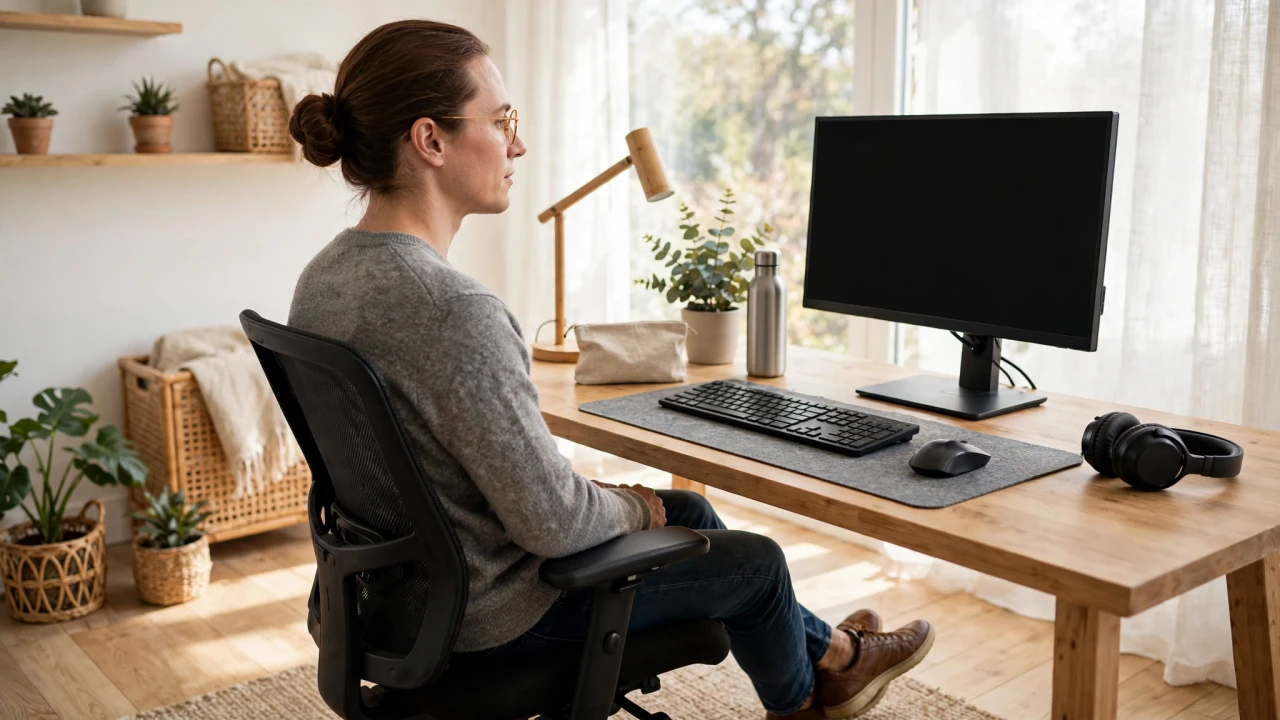
An ergonomic setup — monitor at eye level, feet flat on the floor — is the foundation of healthy sitting posture.
Key Takeaways
- Healthy posture means balanced alignment — ears over shoulders, shoulders over hips — whether sitting or standing, not rigid "perfect" stillness.
- Your workstation setup does most of the work: monitor at eye level, elbows near 90 degrees, feet flat on the floor, and lower back supported.
- The biggest posture enemy is static time: stand, walk, or stretch for a few minutes every 30–60 minutes.
- Simple desk stretches — chin tucks, chest openers, shoulder rolls — can relieve the tension that builds up from sitting.
- Persistent pain, numbness, or tingling deserves professional evaluation; posture tips complement care, they don't replace it.
Why Sitting Posture Matters
The average desk worker sits for the majority of their waking hours. When that sitting happens in a slumped, forward-head position, the effects add up: the head weighs roughly 4–5 kg, and for every bit it drifts forward of the shoulders, the neck and upper-back muscles work harder to hold it up. Over hours and months, that extra load may contribute to the classic desk-worker complaints — neck stiffness, shoulder tension, tension headaches, and lower-back achiness.
Posture also affects how you breathe and move. A collapsed chest restricts full breathing, and rounded shoulders shorten the chest muscles while weakening the upper-back muscles that hold you upright — a cycle that makes good posture feel harder the longer poor posture persists. The good news is that the cycle runs in reverse too: better alignment, practiced consistently, gradually feels more natural. Health organizations like the NHS and Mayo Clinic emphasize the same core advice — neutral spine, supported lower back, and frequent position changes — as the foundation of desk ergonomics.
The Ergonomic Desk Setup Checklist
Before any tip about "sitting up straight," fix the environment — it's far easier to hold good posture in a well-set-up workstation than to fight a bad one all day:
Chair: Sit back so your lower back touches the chair's lumbar support (add a small cushion or rolled towel if your chair lacks one). Hips slightly higher than knees, thighs roughly parallel to the floor.
Monitor: The top of the screen at or just below eye level, about an arm's length away. If you use a laptop, this is the single biggest upgrade: raise it on a stand or stack of books and use an external keyboard — hunching over a flat laptop is posture enemy number one.
Keyboard and mouse: Elbows close to your body at roughly 90 degrees, wrists straight and floating (not resting on hard edges). Keep the mouse close so you're not reaching.
Feet: Flat on the floor or on a footrest — no dangling legs and no tucking feet under the chair, both of which tilt the pelvis and strain the lower back.
Phone: Don't cradle it between ear and shoulder. Use speakerphone, earbuds, or a headset for longer calls.
10 Tips for Healthier Posture at Your Desk
1. Reset Your Sitting Position Every Hour
Posture decays with time — even a perfect setup degrades after 45 minutes as muscles fatigue. Set a quiet hourly reminder to run a 10-second reset: feet flat, sit tall, roll shoulders back and down, tuck the chin slightly. This micro-habit alone can prevent most of the day's slump.
2. Keep Your Ears Over Your Shoulders
"Forward head" — the head drifting in front of the shoulders toward the screen — is the most common desk posture fault. The chin tuck fixes it: glide your chin straight back (making a gentle double chin) and hold 5 seconds, repeat 5–10 times. It's subtle, doable at your desk, and directly trains the deep neck muscles that hold your head upright.
3. Uncross Your Legs
Sitting cross-legged feels natural but tilts the pelvis, unevenly loads the hips, and encourages a rounded lower back. Keep both feet grounded. If one leg always wants to cross, it's often a sign you need a movement break.
4. Take the 30-Second Stand-Up Break
Every 30–60 minutes, stand up — even briefly. Walk to get water, look out a window, do a few shoulder rolls. Research on sedentary behavior consistently links regular movement breaks with less musculoskeletal discomfort than the same total sitting time done in one unbroken block. Your next posture is your best posture.
5. Open Your Chest
Hours of typing round the shoulders forward and tighten the chest. Counter it with a doorway chest stretch: forearms on a doorframe, elbows at shoulder height, lean gently forward until you feel a stretch across the chest, hold 20–30 seconds. Two or three rounds a day helps reverse the desk hunch.
6. Strengthen What Sitting Weakens
Sitting weakens the glutes and deep core muscles that stabilize your spine, while tightening hip flexors and chest muscles. You don't need a gym: bodyweight glute bridges, planks, and rows with a resistance band, done a few times a week, rebuild the support system good posture depends on.
7. Adjust Your Screen, Not Your Neck
If you catch yourself craning down at your screen, the screen is wrong — not you. Raise monitors, enlarge text instead of leaning in (a common cause of forward head posture), and position reference documents at screen height with a document holder rather than flat on the desk.
8. Walk With Intention
Walking breaks are posture gold — but only if you walk tall. During your breaks, practice the "string from the crown" cue: imagine a string gently lifting the top of your head toward the ceiling, shoulders relaxed and down, gaze forward rather than at your phone. A few minutes of tall walking resets the slump far better than scrolling while you stroll.
9. Mind Your Standing Posture Too
Standing-desk users aren't exempt: locking the knees, leaning on one hip, or craning at a too-low monitor creates its own problems. If you use a standing desk, alternate sitting and standing every 30–60 minutes, keep the monitor at eye level in both positions, and shift your weight or use a footrest to avoid static standing.
10. End the Day With a Posture Reset
Two minutes before you log off: stand tall, interlace your fingers behind your back and lift gently to open the chest, do five chin tucks, and take three slow deep breaths with full rib expansion. It signals to your body that the desk day is over — and pairs nicely with an evening walk for a full reset.

Short stretch breaks every hour relieve the tension that builds up from sitting.
3 Desk-Friendly Stretches for Better Posture
These take under three minutes total and need no equipment — perfect for a mid-morning or mid-afternoon reset:
Seated cat-cow. Sit tall with hands on your knees. Inhale: arch your back gently, lift your chest and look slightly up. Exhale: round your back, tuck your chin, and let your shoulders roll forward. Repeat 6–8 slow rounds, syncing breath with movement — it mobilizes the whole spine.
Upper-trapezius stretch. Sit tall, tilt your right ear toward your right shoulder (don't lift the shoulder), and rest your right hand lightly on the left side of your head — no pulling. Hold 20–30 seconds per side. This targets the exact muscles that tense up during screen work.
Seated spinal twist. Sit tall, place your right hand on your left knee, and rotate your torso gently to the left, looking over your left shoulder. Hold 20–30 seconds, then switch sides. Twists relieve the stiffness of sitting in one orientation all day.
Posture Myths vs Facts
- Myth: Good posture means sitting perfectly still and upright all day.
Fact: The healthiest posture is a changing one. Regular position changes — shifting, standing, walking — matter more than holding any single "perfect" position, which itself becomes a strain if frozen.
- Myth: Slouching will permanently damage your spine.
Fact: Occasional slouching is normal and harmless; problems come from hours of sustained poor positions day after day. Relaxed, varied sitting with regular breaks is the goal — not rigid perfection.
- Myth: You need expensive ergonomic gear to fix posture.
Fact: The highest-impact changes are free: monitor height (books work), hourly movemenbreaks, chin tucks, and uncrossing your legs. Gear helps, but habits matter more- Myth: Back braces or posture correctors fix posture on their own.
Fact: Braces may offer short-term reminders, but relying on them can weaken the very muscles posture depends on. Strengthening and movement habits build lasting change; devices are at best a temporary aid.

A brief walk with tall, relaxed posture resets your body after long desk sessions.
When to See a Doctor
Posture tips help with everyday stiffness and tension — but get professional evaluation when:
- Neck, shoulder, or back pain persists for more than a couple of weeks despite posture improvements and breaks.
- You feel numbness, tingling, or weakness in your arms, hands, legs, or feet.
- Pain follows an injury, fall, or accident, or is severe enough to limit daily activities.
- You notice visible spinal curvature, one shoulder markedly higher than the other, or other structural concerns.
A physical therapist can assess your specific patterns and build a personalized plan — far more effective than generic advice for persistent problems.
Sponsored: check today's offers on recommended wellness products
Frequently Asked Questions
How long does it take to improve posture?
Most people notice less daily stiffness within 2–4 weeks of consistent habits — hourly resets, movement breaks, and a fixed workstation. Deeper changes in muscle balance and alignment typically take a few months of steady practice. Consistency beats intensity.
Is a standing desk better for posture than sitting?
Not automatically. Standing desks reduce sitting time, but static standing brings its own strains (locked knees, leaning, low monitors). The evidence favors alternating between sitting and standing every 30–60 minutes over either position all day.
Can poor posture cause headaches?
It may contribute. Forward head posture and tense neck/shoulder muscles are associated with tension-type headaches in many desk workers. Chin tucks, regular breaks, and monitor-height fixes often help — but frequent or severe headaches deserve medical evaluation.
Should I buy a lumbar support cushion?
It's a cheap, reasonable upgrade if your chair lacks lumbar support — a small cushion or rolled towel that fills the curve of your lower back can make neutral sitting much easier. But no cushion replaces movement breaks and the hourly reset.
Are posture-corrector braces worth it?
They can serve as short-term reminders, but they don't build the muscle strength and habits that sustain good posture — and over-reliance may weaken postural muscles. Most physical therapists recommend exercise and ergonomic habits over braces for lasting results.
Disclaimer: This article is for general information only and is not medical advice. Posture tips and stretches are general wellness guidance; they are not a diagnosis or treatment for any condition. If you have persistent pain, numbness, a spinal condition, or a recent injury, please consult a qualified healthcare professional or physical therapist before starting new exercises.
Which tip will you try first — the hourly reset, the chin tucks, or finally raising that laptop to eye level? Tell us in the comments.


Comments
Post a Comment